
Find your migrated Mediasite videos
In this guide
Content migrated to Panopto
Over the course of summer 2026, the University migrated lecture capture and personal video content from Mediasite to Panopto.
The following Mediasite content was transferred to Panopto automatically:
- All content held in Mediasite personal folders,
- All content held in Mediasite channels and shared areas,
- Lecture capture recordings from the academic years 2019/20 to 2025/26 inclusive.
More information on the Mediasite to Panopto content migration can be found on SharePoint.
Find your personal Mediasite content
To locate Mediasite videos that belonged to you as an individual user, rather than a module:
- Access Panopto with your University credentials.
- Select My Folder from the left-hand side menu.
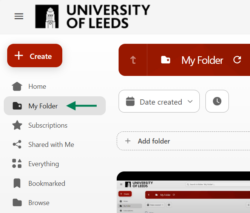
- In your My Folder, you will see a sub-folder titled Mediasite migrations.

- Open the Mediasite migrations subfolder to find your personal Mediasite videos.
Find module-related and lecture capture content (from 2019/20 until 2025/26)
To locate migrated module-related content and lecture capture recordings from 2019/20 until 2025/26:
- Access Minerva and navigate to your module pre 26/27 module.
- You will not be able to open your Mediasite (lecture capture) folder. A banner will inform you that Mediasite is no longer available, and that to view recordings for this module, you need to use the Panopto (lecture capture) link at the bottom of the module page.
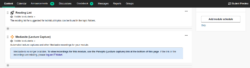
- Navigate to the bottom of your module page and locate the Panopto (lecture capture) folder.

- Open the Panopto (lecture capture) folder to find your module-related videos and lecture capture recordings migrated from Mediasite.
Ask for help with migrated content
If you cannot find migrated videos or if there are any issues with your migrated content, please log an IT ticket.
< Return to Panopto Staff Guides
Page last checked: September 2026