
How to Fix Issues with Migrated Mediasite Content - Staff Guide
In this guide
Content migrated to Panopto
Over the course of summer 2026, the University migrated lecture capture and personal video content from Mediasite to Panopto.
The following Mediasite content was transferred to Panopto automatically:
- All content held in Mediasite personal folders,
- All content held in Mediasite channels and shared areas,
- Lecture capture recordings from the academic years 2019/20 to 2025/26 inclusive.
Fixing duplicate slides in recordings
Video guide - 1 minute watch
Fixing Duplicate Slides in Recordings
Text guide - 1 minute read
A common issue with migrated content is the addition of a slide feed that 'duplicates' the primary video, causing issues in embedded videos in Panopto. This is due to the way that Mediasite exports video content. To Fix this issue, you can delete the duplicate slide file from the Panopto interface.
Step 1. In a video with a duplicate slide file, go to the settings menu.

Step 2. Select the 'Streams' option from the left side menu.
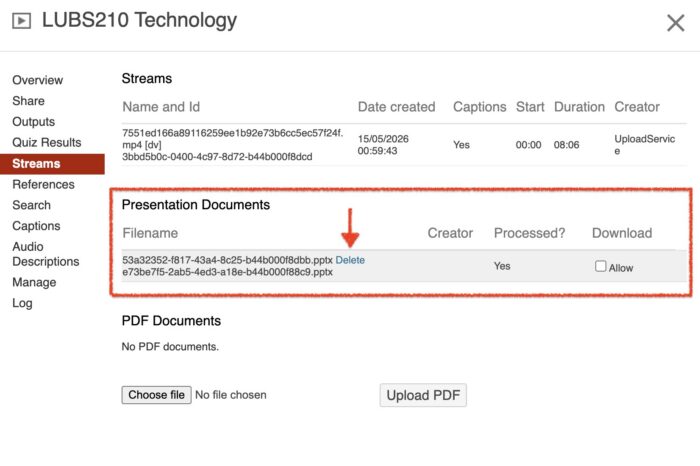
Step 3. Identify the slide file and select 'delete'.
Please note: deleting the slide presentation file is not reversible so check that the file is not required before deletion. The video will reprocess and the duplicate slides issue will be resolved.
Ask for help with migrated content
If you cannot find migrated videos or if there are any issues with your migrated content, please log an IT ticket.
< Return to Panopto Staff Guides
Page last checked: September 2026