
Testing and clearing the results of a Vevox poll
You may wish to test or practice your Vevox sessions before your live event, online meeting or class.
It is important to clear these test results that are now linked to your polls because:
- You are unable to edit polls that have results
- If you do not do this you will have to reopen each poll.
You can clear the results of individual polls, multiple polls or all polls within a session.
To clear the results of an individual poll
- Select the poll you want to clear by selecting the checkbox. (When a poll has results it is it will have the words Show results at the bottom of the question.)
- Select the 'Clear Results' option in the top right corner.
- Clearing the results of a poll is an irreversible action so you will be prompted to confirm the action. To continue press Yes when asked to confirm the deletion.

To clear the results of multiple polls
- Select all the polls you would like clear from their results by selecting their checkboxes.
- Clearing the results of a poll is an irreversible action so you will be prompted to confirm the action. To continue press Yes when asked to confirm the deletion.
- The poll will be back in the state it was when you created it and you can now make some edits or ask the poll again when it says 'Open poll'.

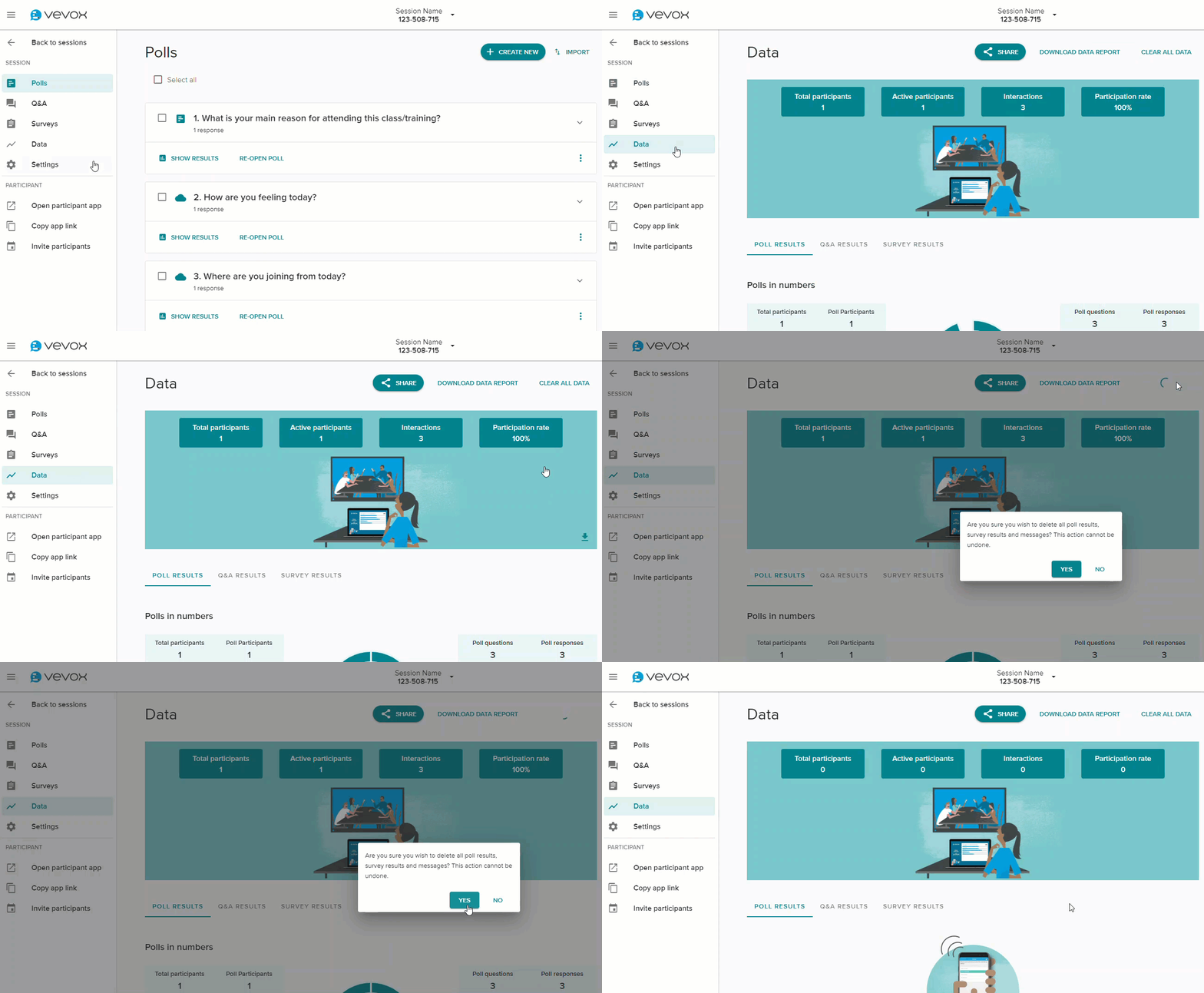
To clear the results from all polls within a session
- Go to the Data option in the navigation menu on the left.
- Select the Clear all data option from the report summary. Note that this action can not be undone, and should be used with caution.
For further information see, Clear the results of a poll on Vevox's website.