
Minerva Monthly Update - June
- Tags
- News for Staff
The June Minerva update brings two new features to Tests.
Lock answer options in a fixed position for multiple choice and multiple answer questions
Staff can now lock specific answer options in a fixed position so they remain in place when other options are randomised. This is useful for answer choices such as 'None of the above' or 'All of the above' that should always appear at the end of the list regardless of randomisation settings.
When creating or editing a multiple choice or multiple answer question, you can designate specific answer options as locked. First select 'Randomise answers' in the Test Settings, then select the lock icon next to the answer option. Locked options remain in their set position during randomisation while all other options shuffle as expected.
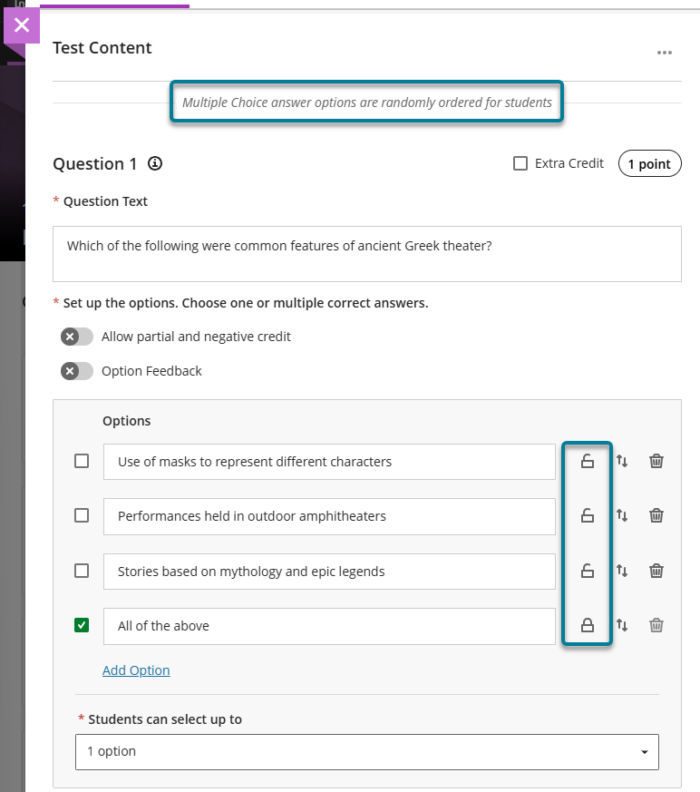
Instructors can remove a lock any time while editing the question before students have submitted attempts. Once students have submitted attempts, locking and randomisation settings are fixed and cannot be changed to ensure fairness.
Provide answer-level feedback for multiple choice and multiple answer questions
Staff can now add feedback for each answer option in multiple choice and multiple answer questions. This helps students understand why each choice is correct or incorrect after an attempt is submitted.
When creating or editing a multiple choice or multiple answer question, staff can turn on 'Option Feedback', which prompts Feedback textboxes to appear beneath each answer option. Instructors can enter the answer options and feedback for any of the options.
At this time, option-level feedback is displayed to students for all answer options. We have been advised that in a future release, students will only see option level feedback for the answers they select.
