
Module Announcements - Staff Guide
Announcements are module level communications. They go to all members of the module (staff and students). They are an ideal way for staff to post time-sensitive information, for example:
- A welcome at the start of the module, with audio/video
- Due dates for assignments and projects
- Corrections/clarifications of materials
- Late timetable changes
Announcements appear in the Activity Stream and the module as a pop-up when students and staff enter the module. They will also see a number indicator next to the Announcement tab indicating they have unread Announcements.
Create an Announcement
The workflow to create an Announcement is: staff create an Announcement, and can then save a draft or post now (if the Announcement is to go immediately), if saving you can post it later from the announcement overview page. Announcements that are scheduled or posted immediately can also be emailed to module members.
Students and staff don't see who posted an Announcement - add your name to the text of your announcement as required.
Please note
Announcement Views
Announcements have viewer information listed e.g. you can see 2/11 people have viewed an Announcement in Minerva:

You can click the viewer information to see which students have not yet viewed the Announcement in Minerva. The interface lists the students on the module and whether they have read the Announcement:
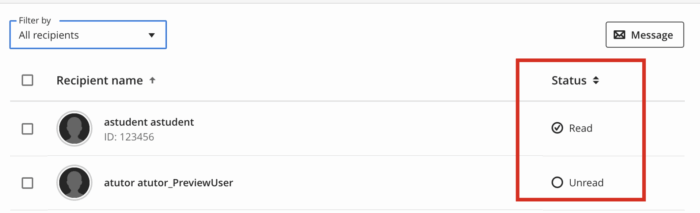
If you wish you can use the Filter to just see who hasn't read it, then you can select students and send them a Message via Minerva:

Read – Announcements
See Announcements on Blackboard's website for guidance on creating and scheduling announcements as well as editing and deleting them. If you are interested in adding a welcome audio/video for your module, read our guide on how to use the recording tool.