
Intermittent slowness accessing Minerva via bookmarks or direct links
What is happening?
Some users may currently experience issues when accessing Minerva, particularly when using bookmarks or direct links to subpages.
In some cases, Minerva appears to begin loading but does not complete. Users may see a white background, and their name (normally shown at the top left of the page) may appear as “undefined undefined”.
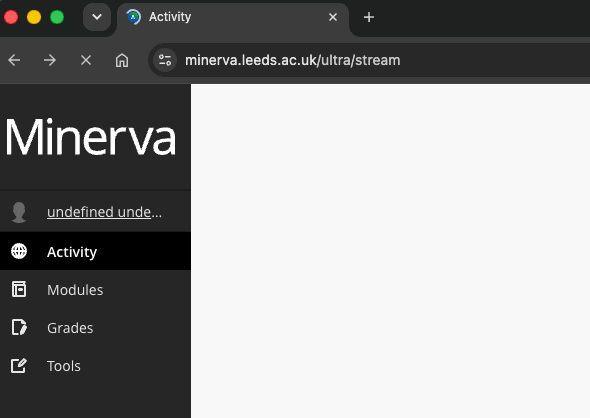
How does this affect me?
Some staff and students are unable to fully access Minerva, which may prevent them from accessing module content and tools via:
- A saved browser bookmark
- A direct or bookmarked subdirectory link (e.g., https://minerva.leeds.ac.uk/ultra/)
Workaround
If you experience this issue:
-
Go directly to the top-level Minerva URL: https://minerva.leeds.ac.uk/
-
If you use a bookmark, update it to point to the top-level Minerva address (above), rather than a sub-page.
Updating your bookmark (Chrome example)
- Open your bookmarks
- Right-click the Minerva bookmark
- Select Edit
- Replace the URL with: https://minerva.leeds.ac.uk/
- Save
For other browsers:
- Microsoft Edge: Follow a similar process using Edit favourite
- Firefox: Use Edit bookmark
- Safari: Use Edit Address in bookmarks
If this does not resolve the problem for you, please login to the IT website, search for Something broken? and complete the form.
When will this be resolved?
This is an ongoing issue. The supplier is aware and is working on a resolution.