
Minerva Monthly Update - May
- Tags
- News for Staff
Module switcher search

Second discussion due date visible in Gradebook
- Overview
- Gradable Items

Gradebook Group filter and grading of Blackboard Assignment/Test
When a group filter is applied in the Gradebook Grades view, the same filter is now applied in the grading interface by default. Only students from the selected group are shown, and the active group filter is displayed. This can be useful if staff only want to grade students within a certain group.
To apply a filter, go to the Grades view in Gradebook and look for the Filter option (above the table of assessment items):

This change does not apply to assessments that are marked anonymously. Delegated grading workflows can be utilised where there is anonymous marking.
See our guide on how to create groups in a Minerva module to utilise this workflow. If you are interested in delegated grading, see either our guide on Blackboard Assignment or Blackboard Test.
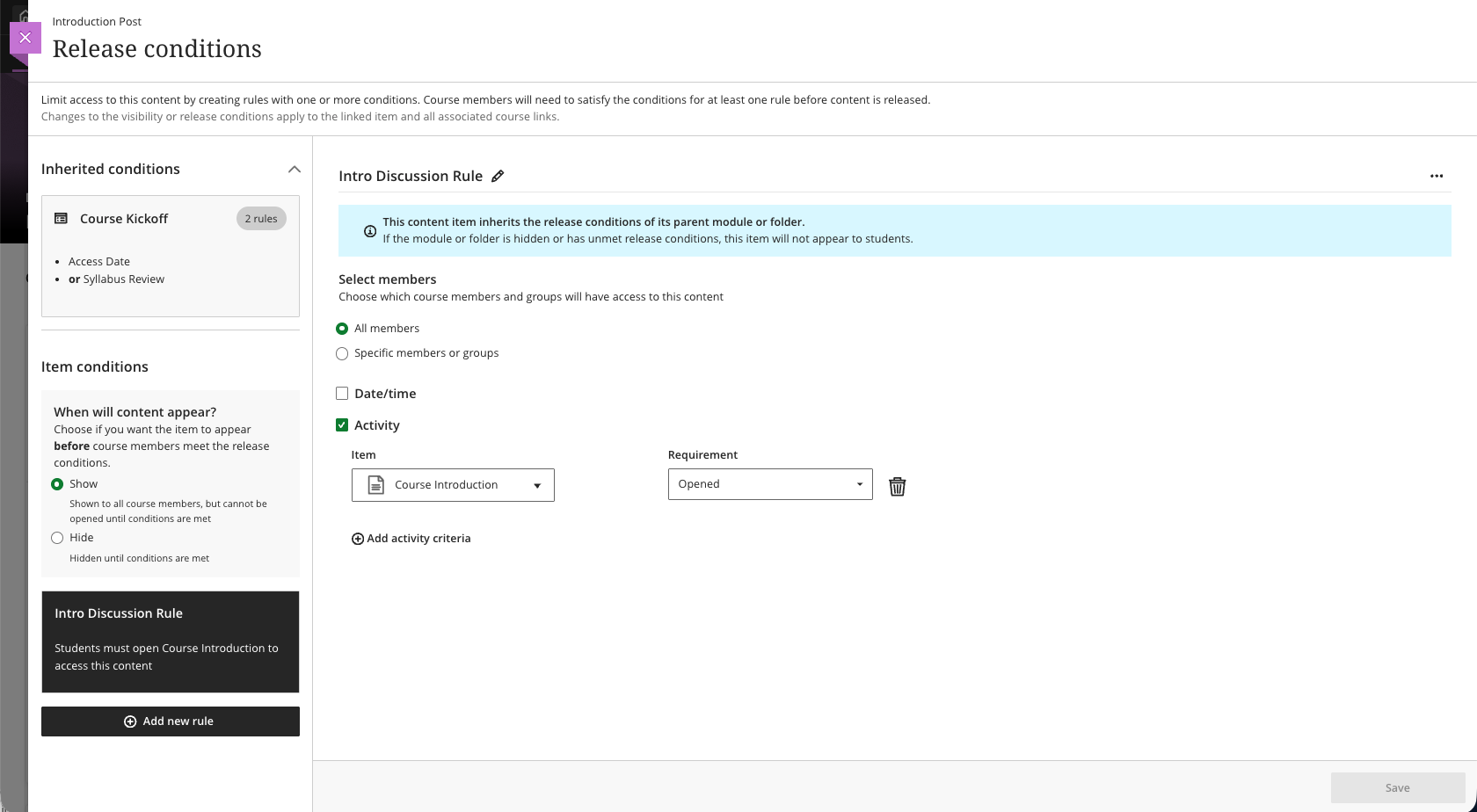
Release conditions inherited from learning modules and folders
When instructors open the Release Conditions panel for an item inside a learning module or folder, a read-only summary of any conditions inherited from the parent container appears alongside any conditions applied directly to the item. This helps instructors understand the full set of access rules in place and determine whether additional conditions are needed.
Visibility of Discussions
Discussions that are hidden within a learning module or folder are no longer accessible from the Discussions tab. Discussions now follow the release conditions applied at the learning module/folder level.