
Read about the latest Vevox updates
- Tags
- News for Staff
Features and Updates:
Read about the new features and updates available in Vevox, the University's interactive polling tool.
New features:
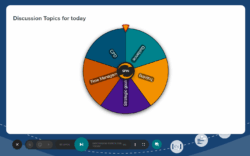
- Spin the wheel - Create a wheel of activities/names/topics and spin to select an item at random
Updates:
-
Advanced options for Surveys and self-paced quizzes
- Survey schedules: Automate the times when a survey is opened and closed for your participants to be able to complete
- Self-paced quiz time limits: Set a limit for how long a participant has to answer a self-paced quiz
- Self-paced quiz summary screen options: Configurable options for what participants see when they complete a self-paced quiz
- Adjustable points scoring: Change the number of points awarded for each question
- Partial scoring: Choose whether points are awarded for individual parts or only for answering all parts correct, for questions with multiple correct answers
- Survey auto save: Unsubmitted responses are now saved in draft format so they are not lost when navigating away from the survey.
-
General updates
- Pin on image: Added support for more correct answer shapes and grouping shapes, along with added support for multiple correct answers in pin on image questions
- Support for Panopto videos in presentation content
- Support for hyperlinks, superscript and subscript text
- Improvements to the Minerva/Vevox integration.
Guidance and support:
Book a 1 to 1 support session if you would like to know more about Vevox, support on how to use it, or if you require an update on new functionality available in the system.