
Minerva Monthly Update - August
- Tags
- News for Staff
Navigation
Full-page content navigation
Learning modules, folders, and individual content items—such as documents, assessments, links, and media—now open as full pages instead of sliding panels layered over the module outline. This update extends the January move to full-screen course pages so that content inside a module opens the same way.
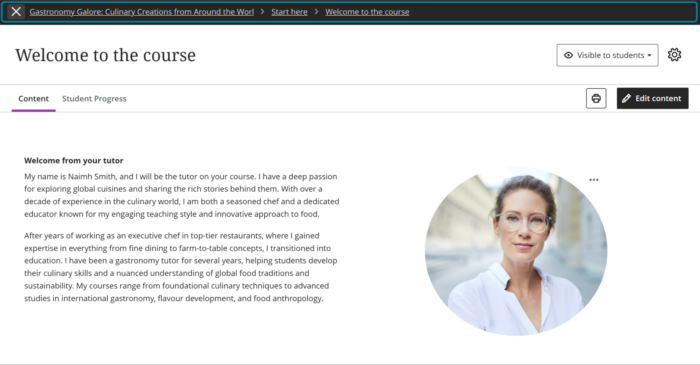
Breadcrumbs
Breadcrumbs now appear on content pages, showing where you are within the module and folder structure to add contextual clarity. Breadcrumbs reflect course structure automatically, require no instructor setup, and complement existing navigation rather than replacing it.
Note: There is a known issue with Breadcrumbs currently. All items appear hyperlinked when some can't be clicked. An update in September should remove the underline, making it clearer they can't be clicked.

Home icon
The Home icon now takes you to your list of modules on Minerva, rather than the My Leeds page.
Gradebook
The Gradebook has had a major update; in particular, the Grades view (called Grid View going forward) has been reworked. Updates relate to the user interface and how information is presented; you should not see changes to functionality.
Different views
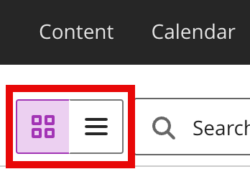
There were 4 views: Overview, Gradable Items, Grades, and Students. Now there are 2 views: Grid View (formerly Grades) and List View (formerly Gradable Items). These icons can be used to switch between Grid View (represented by 4 squares) and List View (represented by 3 lines).
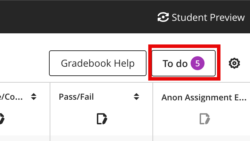
The Overview is available via the Grid View in a To do panel. To do highlights the same information as the Overview did: what needs marking and what grades need posting (returning to students).
The data previously accessed via the Students view can be obtained by clicking on a student's name (in Grid View or List View).
Grades (now Grid View)
This view has been reworked, so will look very different.
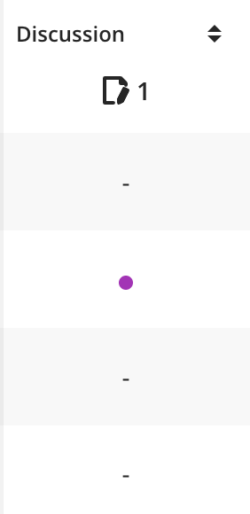
You will notice some new icons. For example, new submissions are indicated by a purple icon:
To grade work, there is a new marking icon which appears under the column header, i.e., the name of the assessment (this will not work for integrated assessment tools such as Turnitin or Gradescope):

There is a new Post icon, also under the column header (this will only be available when there are grades to post):

Some things have moved. Importantly, the Upload/Download Gradebook option is now accessed via the Settings.
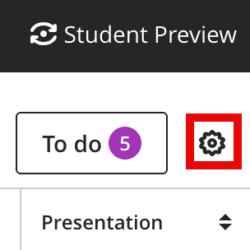
You will also notice the search and filter have moved next to the options to switch views.
If you click column headers (the name of an assessment), an assessment details panel now opens. This highlights key information about the assessment. It is particularly useful for Blackboard assessments, for example, any students with accommodations or exceptions are highlighted here.
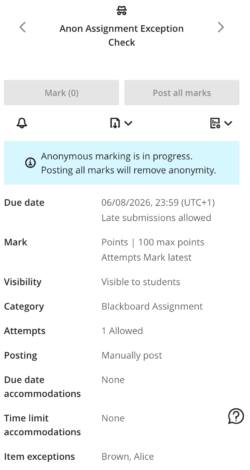
In the new Grid View it is no longer as clear which specific students have had their grades posted and when an assessment item is no longer available to students. We have fed back to our supplier that we would like this to be clearly shown again. In the meantime, you may find this information easier to access via List View. We did have an issue where the student ID was not present in the Grid View of the Gradebook. This is now resolved. If staff do not see it, go to the Gradebook settings (select the settings icon) and under 'Student Options' it can be toggled on.
Support resources
We have created a short video highlighting the key Gradebook changes.
Our supplier has also provided a number of resources on the Gradebook changes. Bear in mind that these resources are assuming you use Blackboard assessment tools (like Assignment and Test). Many of the features referenced (e.g. submission IDs, accommodations, exceptions) do not apply to integrated assessment tools like Turntin and Gradescope. You may also see some references to Courses which we call Modules on Minerva.
See our guides on the Gradebook for Leeds-specific help.
Minerva Document - Content Editor (beta)
Our supplier (Blackboard) is introducing a new content editor. At the moment, this is only available in Minerva Documents. You don't have to use the new editor. You are given the choice of using the new editor or 'classic' (current) editor after you select the Content option:

The new editor has improvements, including better options for creating Tables and Lists, and in general provides a better user experience. It's still under development though; these features are not currently available:
- Adding files from Content Collection
- Uploading files from cloud storage providers
- Adding images from a URL
- Creating equations using LaTeX
Our supplier have published guidance on the key differences between the two editors.
See our guide for more information about Minerva Document.
Duplicate
Staff can now duplicate items on the Module content page. The duplicate retains all content and settings from the original. LTI items (integrated items like Turnitin and Gradescope) are not supported for duplication.
A new Duplicate option appears in the three-dot icon menu (…) for every item. Selecting Duplicate creates a copy of the item with 'Copy' appended to the name. The copy is hidden from students by default. Staff can rename and edit the copy before making it visible to students.

Blackboard Tests
Export Question Banks
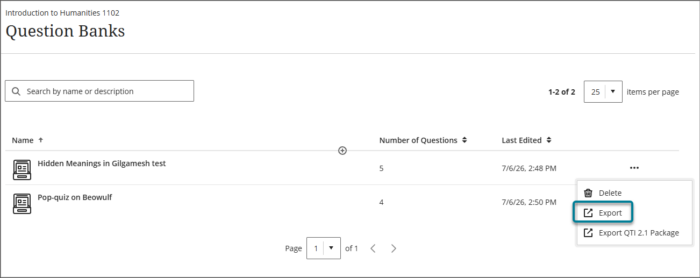
It is now possible to export Question Banks which can then be imported into other Minerva modules. This makes it easier to share Question Banks. To export, select the three-dot icon menu (…) and then Export.
Answer-level Feedback
The Minerva June release introduced the answer-level feedback feature. With this update, students will only see answer-level feedback for the answers they selected.
For general information on Blackboard Test, browse our guides.
'Original' module/organisation warning
'Original' is the term referring to the old version of Blackboard modules/organisations. At Leeds, we moved Minerva modules to the latest version of Blackboard for the 2022/23 academic year.
From January 2027, Original modules/organisation will move to 'read only'. Any Original modules/organisation will highlight this forthcoming change to staff when they enter them. While all modules created since 2022/23 are on the latest version, some of our organisations are still on the old version (Original). We have attempted to contact staff enrolled on these organisations to see if they are still in use. If you see this warning for an organisation that is still in use, please contact us via the IT Service Desk so we can support you in moving it to the latest version.