
Update to Microsoft Class Teams linking in Minerva
- Tags
- News for Staff
The method of linking from Minerva to Microsoft Class Teams has been updated. The new linking method has replaced the existing tools and will not affect any existing Class Teams created via Minerva.
What has changed?
In the Details & Actions menu within modules/organisations, the link has changed from:
- Microsoft Teams > Enable/Open Microsoft Teams
to: -
Microsoft Education > Enable/Open Microsoft Education
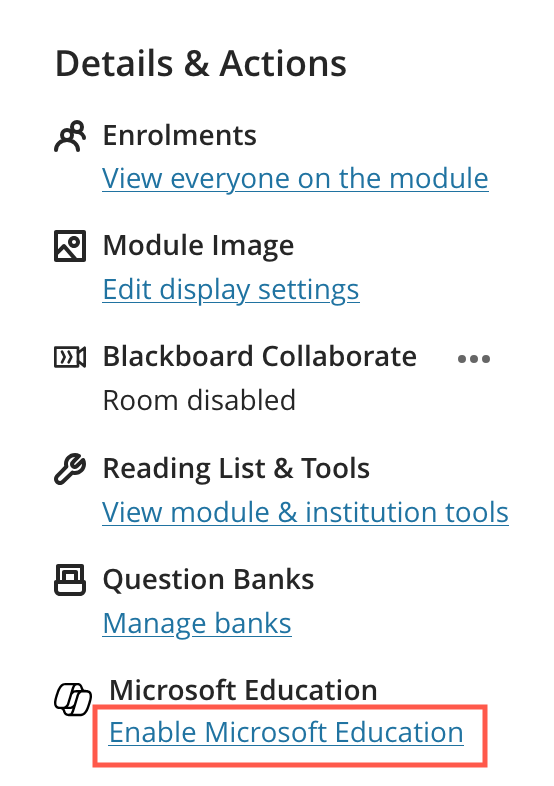
When accessing an existing Class Team or enabling Microsoft Education through the Details & Actions menu, both staff and students will be prompted to complete a first-time setup process.
For detailed instructions and step-by-step guidance on enabling Microsoft Education, please refer to the Create and activate a Minerva Class Team guide.
Due to changes made by the vendor, some Microsoft Class Teams have had their connections to Minerva modules restored. As a result, you may receive Microsoft Teams notifications for modules you are already enrolled on. We apologise for any inconvenience this may cause.
Access issues
Recently, we have had reports of the old 'Enable/Open Microsoft Teams' link failing to display in the Details & Actions menu. Whilst this issue has not been fully resolved with the update to the new link, this update should reduce the number of occasions where this issue occurs.
-
If the link disappears after enabling Microsoft Education and refreshing the page, simply exit and re-enter the module/organisation.
-
If you still cannot see the link, check that your browser is not in incognito/private browsing mode, as the link will not display in this mode.
Note: If you still don’t see the Enable/Open Microsoft Education link after following the above steps, please see the Microsoft Teams troubleshooting guide for further advice.
If none of these troubleshooting steps resolve the issue of not seeing the link, please create a support ticket for technical assistance, you can do this via the IT website. This issue is being investigated by our supplier.