
Minerva Monthly Update - August 2025
- Tags
- News for Staff
In the August update, there is a new table of contents in Learning Modules for students, a new method for creating video/audio in Announcements, an AI option to help you format Minerva Documents and some minor changes to copying integrated assessment tools. Later in August, there will be a change to how LaTeX is rendered in Minerva.
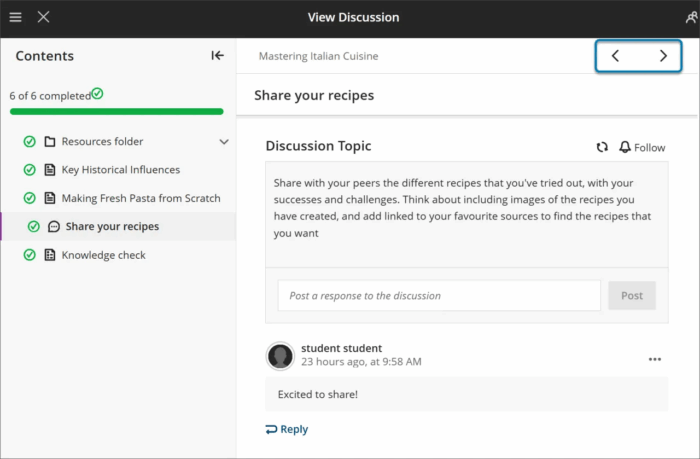
Learning Modules - Table of Contents
This is currently only available in the student view but will come to the staff view soon. When students navigate Learning Modules, they will now see a table of contents to help them move between items more easily. Staff can see this by using the Student Preview function.
Creating Video/Audio in Announcements
The technology used to create video/audio in Announcements has been updated. This option is also available in Blackboard Feedback tools e.g. for Assignment and Test, but has not been updated (it will be in the future). Improvements include a transcript and an option to record from screen.
When you select the record option, you will see the options available:

For further help, see our Using the Recording Tool in Minerva guide.
Use AI to help format Minerva Documents
AI will suggest a structured layout, images and knowledge checks. All suggestions must be reviewed by you and can be edited before the Document is made available to students in Minerva. To access the AI option, select the AI indicator when in the edit view of Minerva Documents:

For more information on Minerva Document, see our guide.
Copying Integrated Tools in Minerva
In Minerva we have a number of tools which are integrated with Minerva e.g. Turnitin, Gradescope, Feedback Fruits. Previously, it was not possible to copy individual items in the Minerva interface. It is now possible but, in many cases, this is unlikely to save time as you still need to set up the tool for the new module.
Notable exceptions are Turnitin (which will need submission dates/settings checked only) and Feedback Fruits which appears to copy but will have technical issues.
It is important that any copied content is checked thoroughly, for more information, read our Minerva copy guide.
Minerva - change to the way LaTeX is rendered
The way LaTeX is rendered will change in Minerva w/c 25 August (after resits). A new MathJax integration will instead render any LaTeX entered in the Minerva content editor. The integration is the first step by our supplier (it is under development and we expect more MathJax features to follow). The new integration will be beneficial to students as the current method for rendering often fails and also produces formula as an image which is not accessible.
We have observed that in switching to MathJax, LaTeX with styling added via the Minerva math editor will fail to render. However, the LaTeX is still present and can be edited.
If you use LaTeX in your module, we can give you early access so you can observe whether this change will affect your content. Please e-mail us at [email protected] if you use LaTeX in the Minerva content editor.