
Minerva Monthly Update - October 2024
The October update introduces a new option to have email notifications for followed Discussions. There are also updates to how leavers show in the Gradebook and AI options for Question Banks. Recently, a change to how module staff appear on the module content page has been made. A known issue with the Gradebook Overview is also resolved.
Module Staff - who appears on the Module content page
Recently, a change to how module staff appear on the module content page has been made. In the past, two Instructors appeared on the module content page - this was based on surname (alphabetical order). Now, the module leader appears on the module content page. The module leader is determined in Banner.
If the module leader for your module needs updating, this needs to be done in Banner. The student education team in your school should be able to advise on how Banner is updated locally.
Emailed notifications for Discussions
Staff and students now have new options to set up emailed notifications for Minerva Discussions (notifications can also be set for the Minerva Activity Stream).
In your settings for Email Notification (Email me straight away) there are new options to receive an email for:
- Activity on my responses
- Activity on responses I have replied to
- Responses from instructors
- Responses for followed* discussions (on by default)
- Replies for followed* discussions (on by default)
Although there is an 'Email me once a day' setting for 'New discussion messages' we do not recommend using this as it has proved unreliable. You can review your notification settings by visiting the Activity Stream (accessed via the navigation bar on the left when you log into Minerva). Click the settings cog in the top right to amend settings.
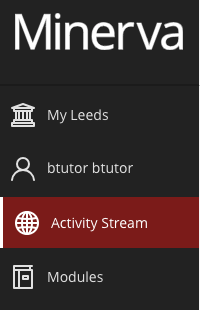
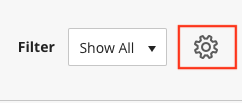
*The option to 'follow' a Discussion is a recent addition to Minerva. When viewing a Discussion, you should see the option to follow it. Click on the Follow button if you wish to do so.

When you follow a discussion, you are prompted to review your notification settings. Check you are happy with the settings for followed Discussions. You will receive an email each time a post is made by default.
For more information:
Leavers now appear in the module's Gradebook
When a student leaves the University, their account in Minerva becomes unavailable. This used to mean you no longer saw the student in the Minerva Gradebook. Now students with unavailable accounts still appear in the Gradebook.
In the 'Grades' tab of Gradebook, you will see the avatar of unavailable students has a strikethrough to indicate their unavailable status:

If you prefer not to see unavailable students, you can change this via the Gradebook settings. Click the Settings cog whilst in the Gradebook (top right). Then select the option to Hide students in the gradebook who no longer have access to the course:

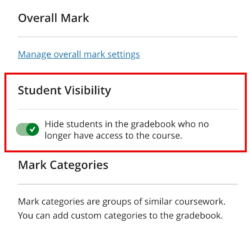
For more information, see our guide on Gradebook settings.
Create Test Question Banks using AI
Question Banks can be used to present different questions to students in a Test e.g. you can choose to randomly present 10 questions from a bank of 20.
Previously you could only create Question Banks using AI from a Minerva Document. Now you can create Question Banks using AI directly in the Question Banks interface. From the Question Banks interface, select the + icon. Then you should see a 'Auto-generate' option. Click this to launch the AI Design Assistant.

The tool will automatically suggest questions based on the name of the module. Enter text into the Description field or select module items to base questions on, to improve results. Remember to click Generate to get new suggestions.
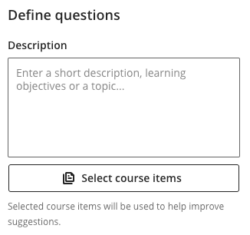
For existing Question Banks, you will also now see an option to add AI generated questions to the Bank.
For more information:
- Guide on advanced question creation using Blackboard Tests (covers Question Banks).
- Guide on AI Design Assistant
Gradebook Overview - known issue resolved
In the September update, a new Gradebook Overview feature was introduced. This contains links to work that needs grading. The Link 'Grade Now' didn't work for integrated tools like Turnitin and Gradescope. This issue has now been resolved.